New in SavedSafe 2.0
Find a file you saved
Forgot where you saved something, or what you called it? Find it and open it with one click.
Use this whenYou saved a letter, photo, or form, and now you cannot find it.
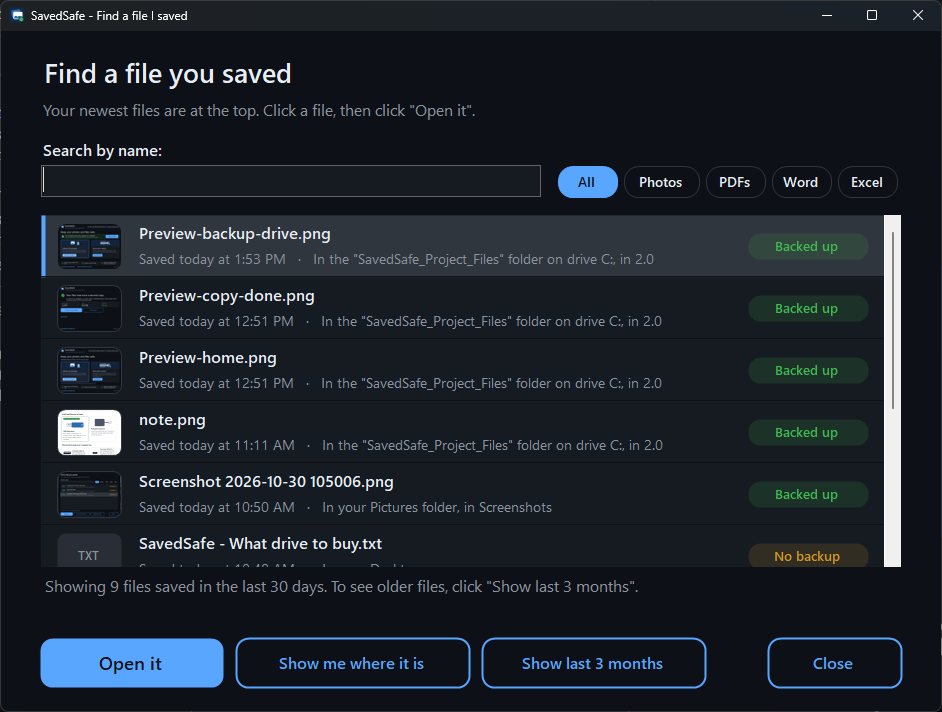
"Find a file I saved" shows the files you saved recently, newest first, with small pictures of your photos. It only looks. It does not move, change, or delete anything.
Steps
- Click the Start button, type Find a file, and click "SavedSafe - Find a file". Or open SavedSafe and click "Find my files".
- Your newest files are at the top. To see fewer, click Photos, PDFs, Word, or Excel, or type part of the name in the box, like tax or Christmas.
- Click the file, then click "Open it".
- To see the folder it is in, click "Show me where it is".
Can't see it?
- At first, SavedSafe shows files saved in the last 30 days. Click "Show last 3 months" to look further back. The button always says how far back it will look next.
- If you saved a lot of files, it shows the newest 100. Type part of the name to find one faster.
Good to know
- Each file says "Backed up" or "No backup", so you can see at a glance which ones need a second copy.
- The first time you use it, SavedSafe offers to put a "Find a file I saved" icon on your Desktop, so it is easy to open next time.
Questions? Email [email protected]. A real person answers.
savedsafe.com/help/find-a-file/→